ControlForge is a single, browser-based studio for DJ logins, a real recording booth, live group voice-tracking, unlimited hour clocks and broadcast rotation. It connects to StationPlaylist and Live365 today, with more platforms coming, and everything it builds lands inside the automation you already run. One tool, one login, every station.
One studio, many platforms
ControlForge is not a new automation system and not a migration. It is one studio that sits on top of the platform you already use, and everything it builds lands right back inside it. Connect StationPlaylist or Live365 today, and as we add platforms your same DJs, shows and workflow come with you, no relearning.
One studio, every job
DJ logins, a real recording booth, live group voice-tracking, unlimited hour clocks and one-click scheduling. Whatever platform a station runs on, the workflow is the same.
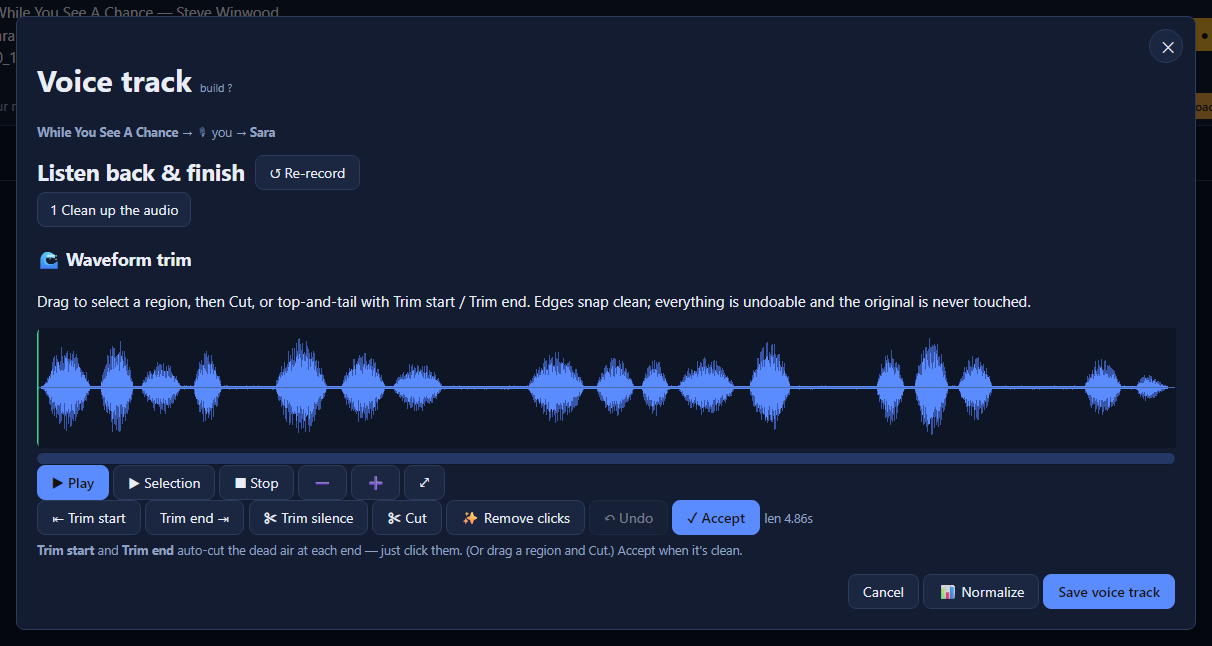
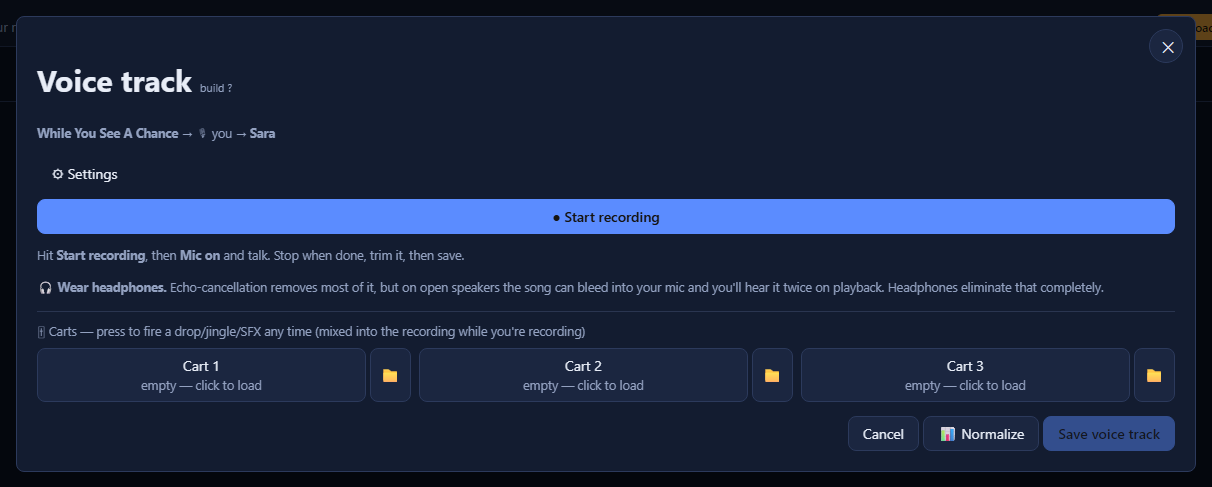
DJs record against the actual outgoing and incoming songs, with a full waveform editor: drag-to-cut, auto-trim silence, click removal, undo and normalize. A 3-button cart wall fires drops live into the take, and the finished audio lands straight in your automation.
DJs sign in with their own name and PIN and see only their assigned hours, with a count of breaks left to record. Per-DJ permissions decide who can reorder, add music, record from a phone, or host a guest.
Your guest goes to one short address, enters a code, and joins the SAME voice track over a live call, from any browser. You both hear the songs and each other, and both voices save into one finished take. No account, no app, nothing to install.
Build as many named hour templates as your format needs, with clock-based category rotation like the big desktop systems. Music, jingles and spots rotate as separate pools, with editable SoundExchange-style artist and album separation.
Paint clocks across a weekly grid, generate a day, a week or a month of real playlists, and publish it all in one click. Publish now, record the voice tracks later, and sweep old playlists away when you are done.
A 3-button cart wall drops jingles, stingers and SFX into the take at the exact moment you press them, baked in live, so a break sounds finished the second you stop.
Whatever platform a station runs on, your DJs, shows, clocks and rules stay identical, so there is nothing to relearn as you add more.
Real screens, real data
Not mockups. A live screen captured from the working tool.
The gap, item by item
Every row below is something broadcasters used to solve with expensive desktop automation and a separate streaming server. With ControlForge it works inside the platform you already have.
| What growing stations ask for | With ControlForge | A basic Auto DJ |
|---|---|---|
| Works across platforms | StationPlaylist & Live365 today, more coming | Locked to one |
| Individual DJ logins and profiles | Each DJ has their own account and shows | Not available |
| DJs recording their own voice breaks | Built-in booth, against the real songs | Not available |
| Group voice-tracking, more than one voice on a break | Anyone joins live with a short code | Not available at any price |
| Recording from a phone or tablet | Works in the phone's own browser | Not available |
| Trim and clean-up editing on a break | Waveform editor, non-destructive | Not available |
| Jingles and stingers fired live while talking | 3-button cart wall, mixed into the take | Not available |
| Hour templates ("clocks") | Unlimited | No clock concept exists |
| Music, jingles and spots as separate pools | Categories, Groups and Clients | One flat library |
| Artist and album repeat separation | SoundExchange-style rules, editable | Not configurable |
Fully integrated
ControlForge does not create a second system to reconcile. Everything it builds is a real, native object on your platform, made through the same connection the platform's own tools use, so you can see, edit or delete it any time.
Connect your platform with the credentials you use today. No separate account, tested live before anything is saved.
Finished voice tracks land straight in your real library, into a dedicated Voice Tracks area.
Generated schedules create real playlists and real events on your real calendar, subject to your platform's own validation.
Your DJs, shows, clocks and rules work the same no matter which platform a station runs on.
The one-click sweep removes old playlists and their events from the platform itself, not just from ControlForge's records.
On-air state and usage shown in the tool come straight from your live station record, never cached.
Pricing
$19.95 a month per station, and if you pay for the year you get one month free. No lock-in: your stream, licensing, hosting and billing all stay exactly where they are today. ControlForge just makes better use of what you already pay for. Stop tomorrow and nothing breaks, everything it built is still on your platform, still on your schedule, still airing.
How it works
Pick your platform and sign in with the credentials you already have, in any browser. No new account, no migration, nothing to install.
Organize your library into rotations, design your hour clocks, paint the week, and generate days of real playlists in one click.
Your DJs record their breaks, solo, from a phone, or with guests joining live, and the finished audio drops straight into the already-scheduled show.
Questions, answered
Sign on
Tell us which platform your station runs on and we will get you set up on ControlForge and walk you through it live.
 Websites & Apps
 Control Automation
 Voice Tracking
 Programming
 Production